|
|
|
|
Products mentioned in this Article
--None--
|
|
|
|
|
|
|
|
|
 |
|
|
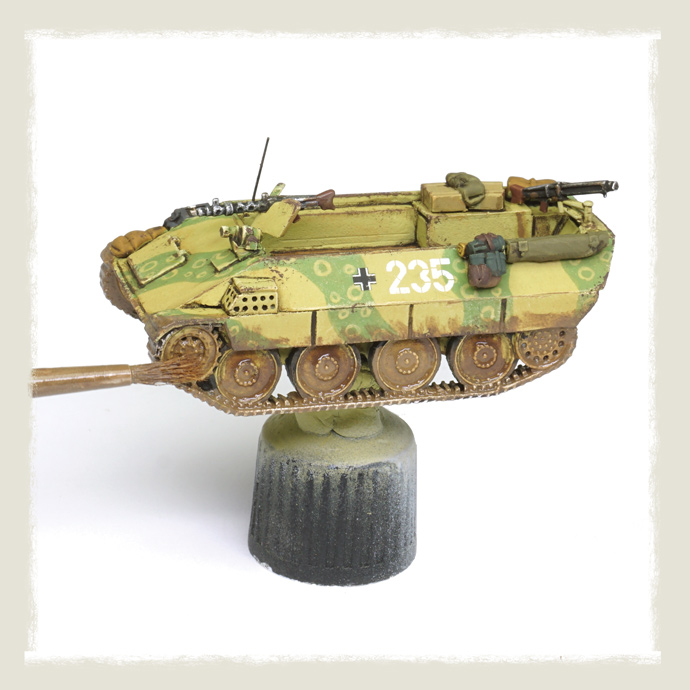 |
Painting a Katzchen with Brush Only
by Rubén Torregrosa
In this tutorial, we will take a simpler approach to painting Flames of War tanks using only brushes, with no airbrushing required. While previous guides have featured extensive airbrush work to achieve striking contrasts on 15 mm models, here we will keep things accessible. We will still combine acrylic and enamel/oil-based paints to achieve varied effects, but with streamlined techniques. For example, we will create chipping effects with a sponge and add dust effects using dedicated enamels. No color mixing will be necessary, making the process faster and easier while still producing impressive results.
Check out the Katzchen in the online store here...
|
|
In a sense, this tutorial is a natural continuation of the simple painting method introduced in Painting the WWI German AV7 Tank: The Art of Enamel Washes. However, in this tutorial, we will use only a brush, even for painting the camouflage, and we will add some dry brushing to create highlights, as described in previous guides. The results may not be as striking as those achieved with the E100 in Painting Paper Panzers, but this method will require only a fraction of the time.
|
|
Step 1: Preparation
|
|
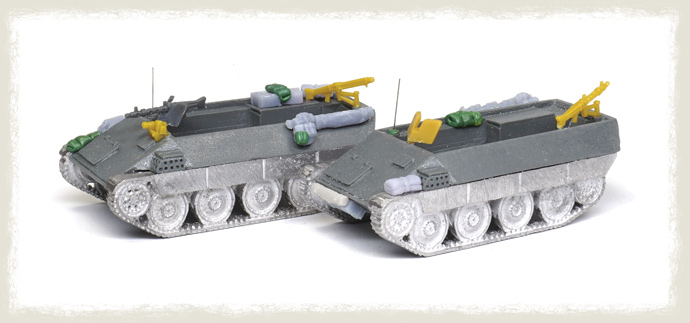
We begin by cleaning the resin and metal parts, paying particular attention to removing any flash and, especially, the mold lines on the tracks. For this, we use a modeling knife and files. To assemble these materials, we use cyanoacrylate glue. To add character and tell a story with each vehicle in the platoon, we can incorporate plastic parts from other kits (such as MGs and infrared lights), 3D-printed stowage, and even sculpt blankets using epoxy putty (green stuff). Antennas can be made using a 0.2 mm nickel-silver rod, such as those from Albion Alloys.
|
|
|
|
Step 2: Primer
|
|
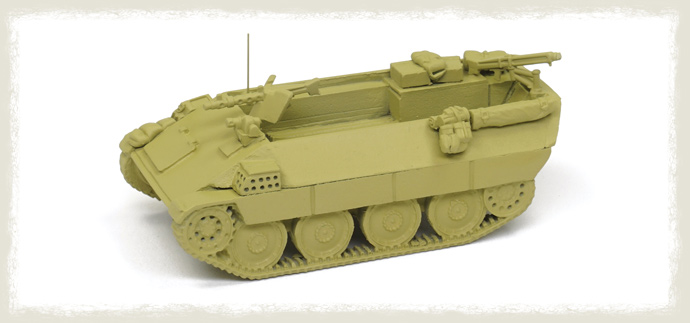
Before applying any paint, it is important to add a primer layer, especially when the model is made of durable materials like metal and resin (as opposed to softer plastic) and is intended for wargaming. The primer helps paint adhere more effectively and increases its durability. To save time, we can use a colored primer that serves as both primer and base coat. In this case, we apply a dark yellow (dunkelgelb) primer directly using a spray can, such as Vallejo's Panzer Yellow (28001).
|
|
|
|
Step 3: Camo I
|
|
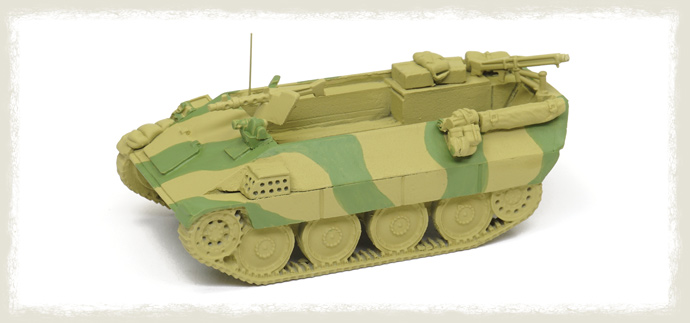
Previously, when using an airbrush, we needed to use masks to create a hard-edged camouflage pattern. With a brush, we can simply apply the paint directly onto the model. For this camouflage, I decided on a two-tone green scheme. I chose a lighter green than the classic German olivgrün to reflect how they sometimes mixed green with lime or dunkelgelb due to supply issues. We can use, for example, Green Base ATOM-20083. After thinning the paint with about 20% water, we apply at least two layers to ensure even coverage using a brush. To create precise edges, we can first paint the outline of the camouflage spot and then fill it in.
|
|
|
|
Step 4: Camo II
|
|
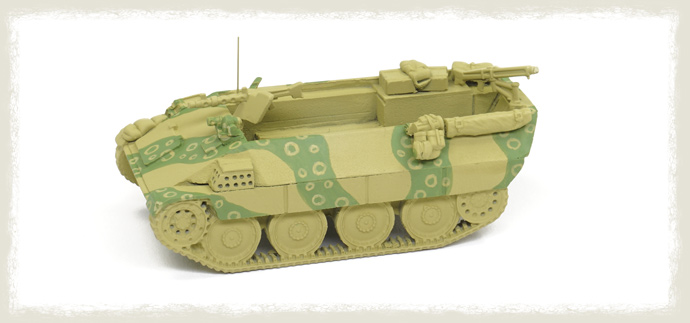
A typical camouflage pattern used by scale modelers for "paper panzers" (or prototypes from the late WWII) involves small circles or dots. Using a color like the undercoat, Dunkelgelb ATOM-20012, and a fine brush, we paint circles of different sizes. The pattern does not need to be perfect, as these would have been painted by the crew using a brush as well. To improve brush control, we thin the paint with about 20% water. If needed, we can correct the shapes by touching up with green.
|
|
|
|
Step 5: Highlights
|
|
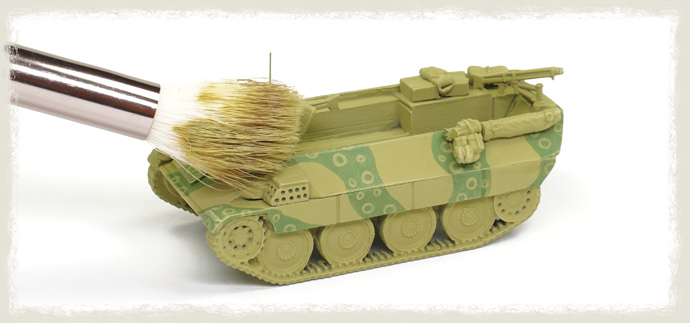
To create contrast and edge highlights on all the edges and details, we can use the classic drybrush technique (as described in Bringing a T-64 to Life Using Oils). This will not only emphasize the model's features but also create an initial layer of chipping effects, revealing the original base color, dunkelgelb, beneath the green camouflage spots. We apply the drybrush in two steps to create more subtle transitions. The first drybrush is done with a color similar to the undercoat, such as Medium German Yellow A.MIG-0617.
|
|
|
|
Step 6: Highlights II
|
|
The second step is done with a lighter color, such as Light Sand A.MIG-0616. When applying the drybrush technique, it is crucial to use a brush that is almost completely dry to avoid applying too much paint. Be sure to brush off most of the paint on a piece of paper or cloth before moving to the tank. Additionally, the best results are achieved by using large brushes, similar to those used for makeup, as they provide smoother and more even coverage.
|
|
Step 7: Stowage and Tracks
|
|
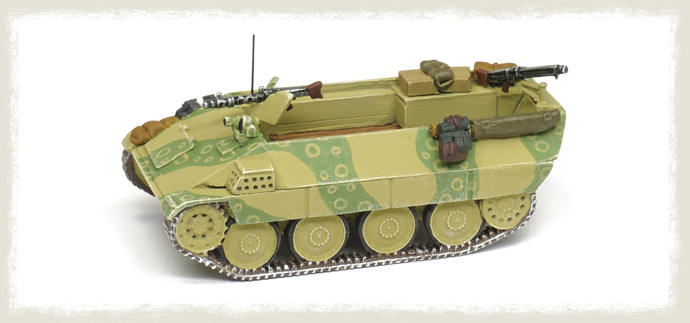
Now we use acrylic paints and a fine brush to paint all the details of the tank, including the antenna, stowage, tools, and tracks. We begin by blocking in these elements with a base color, which we will refine further in subsequent steps. For the tracks, we start with a light gray-brown base coat, followed by a drybrush using metallic paint to highlight the raised details. For color references, you can refer to Crafting Soft-Edge Camo on a German Sd Kfz 251, Part I.
|
|
|
|
Step 8: Decals and Sealing
|
|
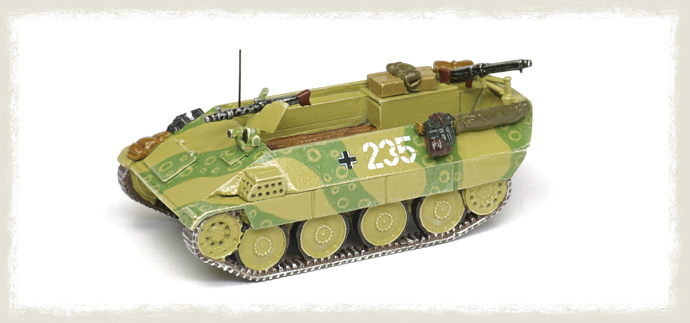
To ensure the decals are perfectly integrated into the model, we first apply a gloss varnish and use dedicated products for the best effect. Once the decals are in place, we apply another layer of glossy varnish to protect them and eliminate the transparent decal film layer. For this, we can use a spray rattle can, such as TTH114 Transparent Varnish Gloss, or even a clear lacquer spray intended for cars (just make sure it dries quickly!). For a more detail tutorial, check How To Apply Decals.
|
|
|
|
Step 9: Enamel Dark Wash
|
|
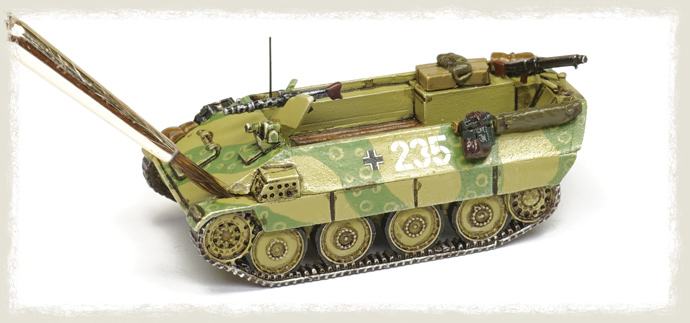
To stand out the recesses and details, we apply a selective wash using an enamel-based wash. While it requires the use of an organic solvent, such as white spirit or turpentine, it offers the ability to remove excess paint, leading to very clean and well-defined results. This is because enamels take hours to dry, unlike acrylic washes, which dry in seconds and do not allow for such adjustments. For this step, we begun using a dark brown wash, like A.MIG-1005 Dark Brown Wash for Green Vehicles, applied exclusively to the recesses and corners using a brush. We let it dry for 30 to 60 minutes. During this time, we can continue working on the rest of the vehicles in the platoon or paint the crew, ensuring that no time is wasted.
|
|
|
|
Step 10: Removing Excess Enamel Wash
|
|
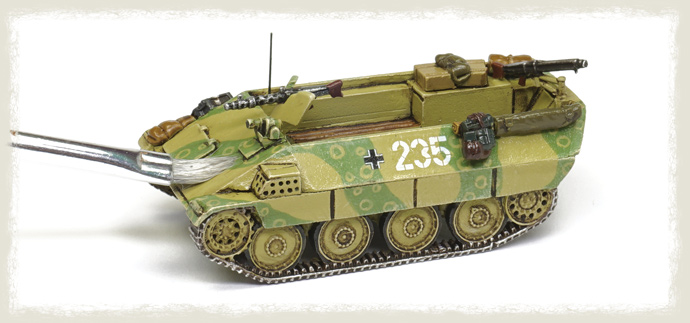
After 30 to 60 minutes, we use a brush or cotton swab moistened with enamel odorless thinner to gently rub the surface and remove any excess wash. On vertical panels, a flat brush can be used to drag the paint downward, creating subtle streaking effects in the process. The glossy varnish will also make it much easier to apply the wash, as the paint will flow smoothly into the recesses and can be easily cleaned off later.
|
|
|
|
Step 11: Sealing with Matt Varnish
|
|
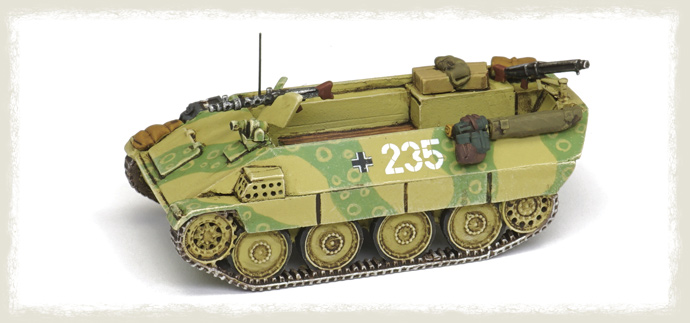
We apply a new layer of varnish, but this time using a matte or ultra-matte varnish, such as Transparent Matt Varnish TTH110. Again, we use a spray can speed up the process. This step is important not only to eliminate any undesirable shine but also to allow us to continue working immediately. Without this varnish layer, we would need to let the enamel dry completely for several hours before proceeding. In addition, we need a matte surface for the following steps, as otherwise, the paint would slide off the glossy surface, which is the opposite of what we want to achieve with the wash. The matte finish helps the paint adhere more effectively and allows us to control the application of subsequent layers.
|
|
|
|
Step 12: Filter I
|
|
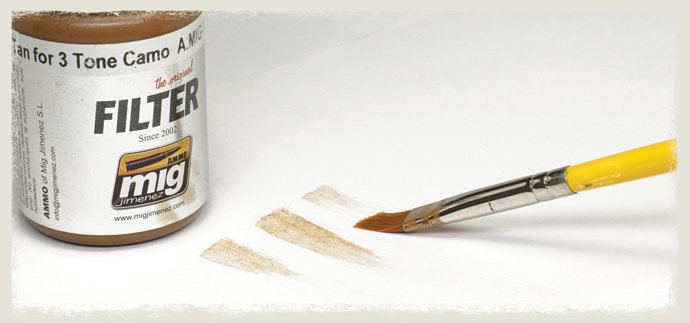
The next step introduces something we have not used before in this series of tutorials: a filter. A filter is a very thin paint mixture (up to 80% thinner) designed to slightly alter the tone of a surface. It can be useful for restoring a color, such as when mixing a color with white to create highlights, which can desaturate the original color. Filters can also be used to create effects like dirt or rust. In a way, a filter is the opposite of a wash: while a wash accumulates in the recesses to add depth, a filter is applied over the entire surface in a very thin layer with a nearly dry brush. The filter subtly changes the overall tone without flooding the details.
The filter subtly alters the overall tone without flooding the details. To prepare a filter, we can thin down a paint with 80% thinner, or use a dedicated product, either enamel or acrylic-based. In either case, it is important to brush off excess paint on a piece of paper or cloth before applying it to the tank. This ensures that only a very thin layer is left on the surface, achieving the desired effect.
|
|
|
|
Step 13 - Filter II
|
|
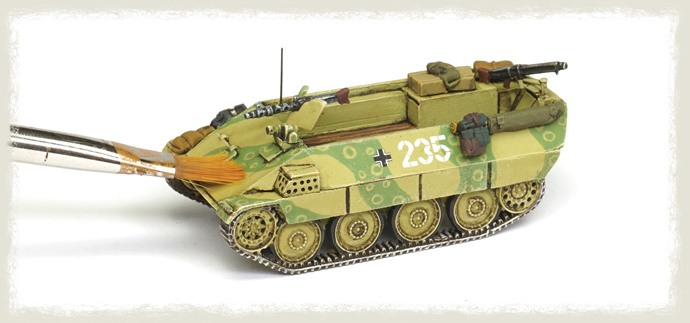
Using a flat brush for an even contact surface, we apply a very thin layer of paint across the entire tank. The color of the filter is important, and here we chose an orange-brown tone for two reasons: first, to restore some of the intensity to the yellow color (since the almost white drybrush had desaturated the dunkelgelb), and second, to create a subtle patina of dirt, enhancing the realism of the model. Acrylic filters would offer similar results, but I prefer using enamel because it gives me the flexibility to completely remove the paint with enamel odorless thinner if needed. This makes it easier to correct any mistakes or adjust the effect without damaging the underlying layers.
|
|
|
|
Step 14: Evaluate the Results of the Filter
|
|
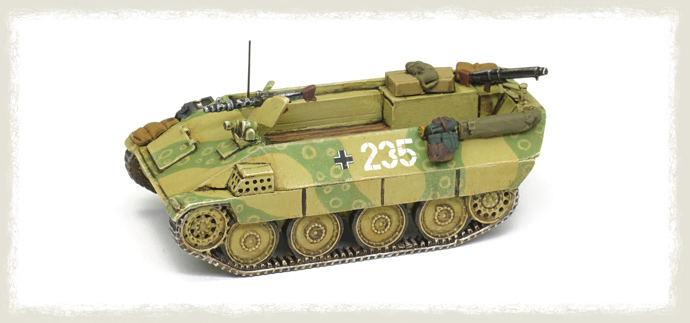
We can apply several layers, waiting a few minutes between each, to build up the effect gradually. In this case, I applied just two layers. Applying too many layers can result in an overly dense effect, which may overpower the model's details and subtle transitions.
|
|
|
|
Step 15: Chipping Effects
|
|
Previously, we learned how to create realistic chipping effects using a brush and two colors to represent superficial (light) and deep (dark) chips. While the brush offers great control, it can be time-consuming. A much faster approach is the "sponge technique." In this method, we literally use a sponge, such as those found in blister packs, to apply the paint.
While it sounds easier than it is, the main pitfalls of this technique are applying too much paint, which can result in "clouds" of chipping effects that look unrealistic and attempting to combine it with the previously mentioned method of using two colors (light and dark) for depth. Since we have very little control over the paint when using the sponge, it is crucial to use it carefully and with restraint.
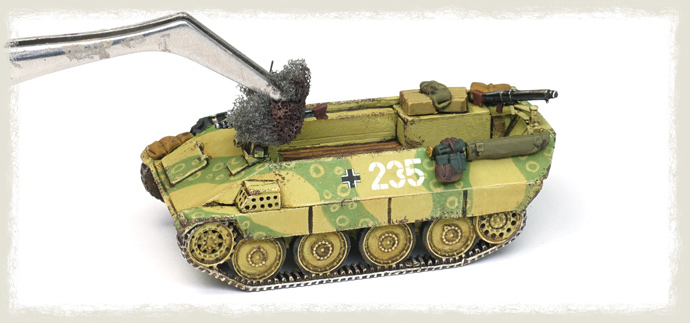
One way to gain more control is by using tweezers to hold a small piece of sponge. It is also important to remove most of the paint on a piece of paper, which will help reveal the possible outcome. For this technique, we use only one color—such as a dark brown like Chipping ATOM-20064—since it is virtually impossible to match the effects of light and dark scratches with the sponge. To apply the paint, gently tap the surface, focusing on the edges or more exposed areas. Avoid applying paint to the middle of flat panels, as this will create unrealistic results.
|
|
|
|
Step 16: Refining the Chipping Effects
|
|
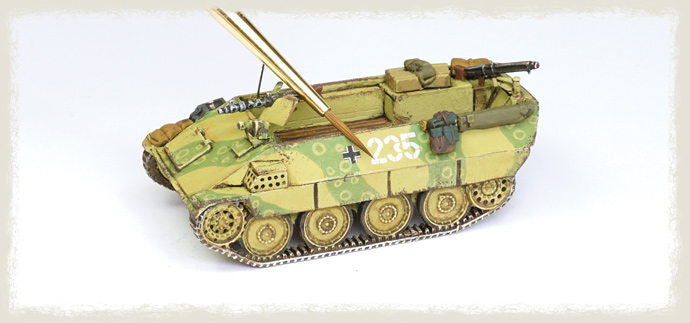
We can refine the chipping effects to make them look more natural. After using the sponge technique, we can blend the "clouds" of chips by using a brush to join them together. Focus on the edges where wear would naturally occur, such as corners and raised details, and apply a bit of paint with the body of the brush to subtly merge the chips into the surrounding surface. To create irregularities, tap the brush lightly on the surface, which will result in a more natural, dotted pattern rather than harsh, defined chips.
|
|
|
|
Step 17: Dust Effects I
|
|
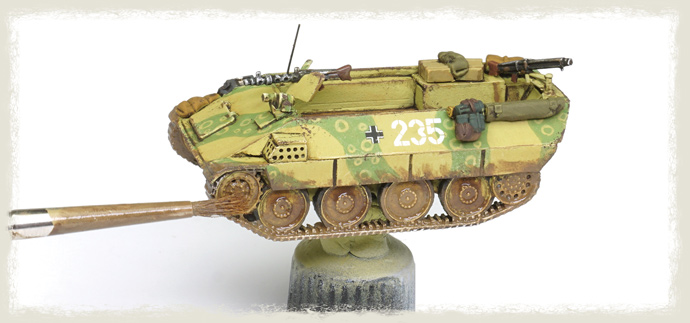
To create dust effects, we have previously discussed using pigments. However, here we will explore a faster alternative. Ready-to-use enamel products can be used to create a variety of natural effects, including mud and different types of dust. After shaking the bottle, we simply apply the enamel directly to the model.
Using an old brush, we apply the enamel irregularly, starting with two Nature Effects colors: Kursk Soil A.MIG-1400 and Dark Mud A.MIG-1405. These two shades—light and dark brown—help create nuanced contrasts, giving the model a more realistic, layered look. We apply the colors one after the other, gently mixing them on the model to create a varied, natural effect.
|
|
|
|
Step 18: Dust Effects II
|
|
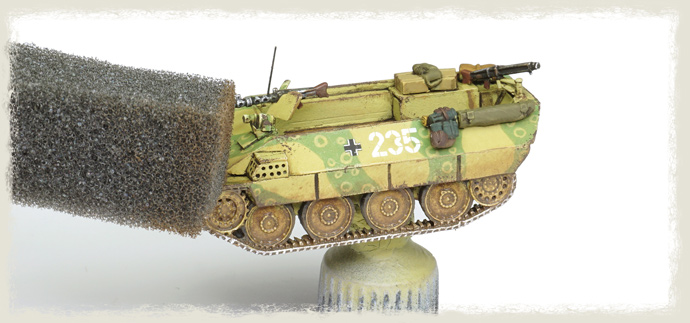
Immediately after applying the enamel, we remove part of it using another piece of sponge. The goal is to asymmetrically remove the enamel, especially from the most exposed areas, while blending the effects into the sideskirts and less exposed parts. We do not drag the paint; instead, we use the sponge in a dotted manner. By gently tapping the sponge onto the surface, we can remove the enamel in an irregular, controlled way, which helps create a more natural and textured effect. This technique helps to create a more natural, uneven look, as real dust and mud tend to accumulate unevenly across a vehicle's surface, with more build-up on the lower or less exposed areas.
|
|
|
|
Step 19: Evaluating the Dust Effects
|
|
Compared to pigments, enamel products will provide a more satin finish, whereas pigments are ultra-matte. This difference in finish can be beneficial depending on the desired effect. Enamels tend to have a slightly glossy or satin sheen, which can create a more realistic, weathered look for mud or dust effects, while pigments give a flat, dry appearance.
|
|
Step 20: Crew
|
|
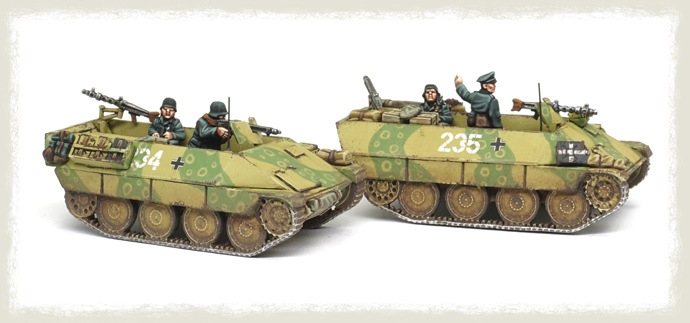
We paint the crew using our favorite painting technique (for example, check Painting WWI French Fusiliers: Combining Quick Washes and Advanced Layering), and fix them in place using cyanoacrylate glue. It is important to note that I have spent more time than originally planned on the stowage and crew. While we use relatively simple painting techniques for the tank itself, the more detailed work on the crew and stowage adds significant character and helps bring the model to life, making it more dynamic and visually engaging.
|
|
Final Results!
|
|
|
Last Updated On Tuesday, December 3, 2024 by Kevin
|
|
|